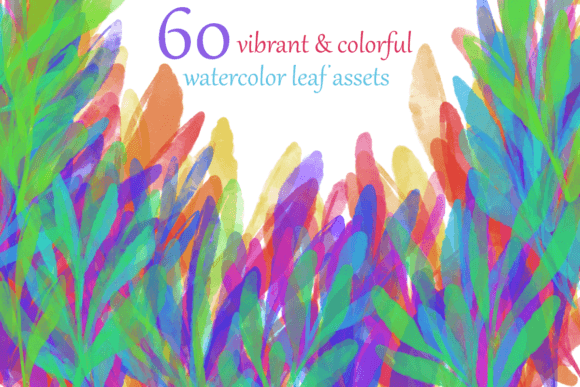
Vibrant Watercolor Leaf PNGs for Modern Creatives
If you have spent any time searching for design assets, you already know how hard it is to find something that feels both organic and polished. Stock photography can feel stiff. Vector icons can feel sterile. And poorly scanned watercolor textures often lose their depth. That is where Vibrant Watercolor Leaf PNGs step in. They sit at a rare intersection of artistic authenticity and practical usability, giving you something that looks handmade but works seamlessly inside a digital workflow.
What Makes These Assets Different
A watercolor leaf PNG is essentially a scanned or digitally captured watercolor painting of a leaf, saved with a transparent background. The vibrant part is not just marketing language. These assets retain the natural bleeding, subtle gradients, and pigment variations that real watercolor produces. Unlike flat vector leaves or heavily compressed photos, each leaf carries irregularities that make it feel like it was painted by hand.
The transparency layer is crucial. Because the background is removed, you can drop these leaves onto any surface without fighting white boxes or awkward clipping paths. This means you can layer them over photographs, text blocks, colored backgrounds, or even other leaves without breaking the visual flow. For designers who work in branding, social media, or print, that kind of flexibility saves hours of manual masking work.
Key Characteristics That Matter in Real Projects
When you evaluate Vibrant Watercolor Leaf PNGs, a few traits separate the genuinely useful assets from the ones that look good in a preview but fall apart in production.
- Color saturation with transparency. The best leaves hold rich pigment even when layered over dark backgrounds. Lower-quality PNGs often turn washed out or develop harsh halos around the edges.
- Natural edge variation. Real watercolor does not cut a perfectly smooth border. A good leaf PNG shows subtle feathering, paint pooling, or paper texture at the edges. This is what makes it read as authentic rather than like a colored shape.
- Consistent resolution. You should be able to scale these leaves up to at least 3000 pixels without visible pixelation. Many commercial projects require print-ready files, and low-resolution assets will not hold up at that scale.
- Botanical accuracy. Whether you need monstera leaves, eucalyptus sprigs, or oak silhouettes, the best collections actually reference real plant forms. Generic blobby shapes will not convince anyone.
Where You Will Actually Use Them
The practical applications go far beyond scrapbooking. In fact, I have seen Vibrant Watercolor Leaf PNGs used across industries in ways that surprised me at first but made perfect sense once I saw the results.
Branding and Packaging
Small product brands often struggle to create packaging that feels premium without a massive photography budget. A set of watercolor leaves can become a signature pattern on boxes, tissue paper, or hang tags. Because the files are PNGs, you can place them directly into templates in Canva, Adobe Illustrator, or even Word without needing advanced design skills. One coffee company I consulted with used a single eucalyptus leaf variant across all their social media headers, product labels, and their website hero image. The continuity made their brand instantly recognizable, and the watercolor texture kept it from feeling corporate.
Digital Content and Social Media
Instagram carousels, Pinterest pins, and blog featured images benefit enormously from organic overlays. Flat backgrounds tend to blend into the endless scroll. Adding a watercolor leaf in a corner or behind a headline gives the eye something to latch onto. Because the files are PNGs, you can adjust opacity and blend modes without damaging the original. I have found that a single leaf placed at 40% opacity behind a bold quote creates a much warmer feel than a solid color block or a generic gradient.
Educational Materials and Handouts
Teachers, course creators, and nonprofit organizations often need materials that feel approachable but not childish. Watercolor leaves work well on worksheets, slides, and infographics. They signal a certain care and thoughtfulness that plain text or clip art does not. A biology instructor might use realistic leaf shapes to label plant structures. A wellness coach might use soft watercolor botanicals to soften the tone of a handout about stress management. The transparency means you can place them behind text without interfering with readability.
Web Design and UI Elements
More brands are moving toward organic design language, and watercolor textures are appearing in hero sections, modal backgrounds, and even button hover states. The PNG format makes this surprisingly efficient. You can use a small leaf as a bullet point replacement, a larger one as a background accent, or a repeated pattern as a subtle texture. Because the images are raster based, they work beautifully with CSS blend modes. A developer can set a watercolor leaf PNG as a div background and use mix-blend-mode: multiply to make it sit naturally on any color.
Practical Benefits You Can Count On
Beyond aesthetics, these assets offer real workflow advantages. If you have ever had to extract a subject from a photo, you know how tedious masking can be. Vibrant Watercolor Leaf PNGs eliminate that step entirely. They come ready to use. For freelancers and small teams, that time savings adds up fast.
Another overlooked benefit is file size. Because watercolor leaf PNGs typically have large areas of transparency and relatively simple color palettes, they compress well. You are not dealing with monstrous files that slow down your website or bog down your design software. A bundle of 50 leaves often takes up less space than a single high-resolution photograph.
Consistency is another strong point. When you purchase a curated set of Vibrant Watercolor Leaf PNGs, the leaves usually come from the same painting session or digital brush set. That means the color palette, paper texture, and brush stroke quality remain uniform across all the files. You do not have to worry about one leaf looking like it came from a different artist or having a completely different white balance.
What to Look for When Choosing a Set
Not all watercolor leaf PNGs are created equal, and a few warning signs can help you avoid disappointment. Watch out for sets that only show preview images with white backgrounds. If the seller does not show you how the leaves look on dark paper or over a photograph, they might be hiding poor transparency quality. Look for real screenshots of the PNGs placed on multiple background colors.
- Check the resolution specifications. 300 DPI is ideal for print. 72 DPI works fine for web but will look grainy in any physical output.
- Look at the edge detail. Zoom in on preview images. If the edges look jagged or like they were auto-traced, the files will not feel authentic.
- Count the variety. A good set will offer multiple leaf types and multiple angles. Having five variations of the same leaf gives you more layout flexibility than fifty identical silhouettes in different colors.
- Read the license terms carefully. Many commercial uses require an extended license, especially if you plan to use the leaves in products for sale or in branding for a paying client.
Bringing Them into Your Workflow
Once you have a solid set of Vibrant Watercolor Leaf PNGs, you will want to organize them in a way that makes retrieval fast. I recommend naming files by plant type and color family rather than leaving them with generic filenames. A file called monstera_emerald.png is infinitely more useful than leaf_031.png when you are mid-project and looking for a specific shape.
If you use Adobe Photoshop or Affinity Photo, consider keeping a dedicated folder in your Assets panel. For web projects, you can compress the PNGs further using tools like TinyPNG without noticeable quality loss. For printed materials, avoid additional compression and keep the original files intact.
One technique I have seen work well is combining multiple leaves into a custom brush in Procreate or Photoshop. This extends the life of the assets and lets you create entirely new arrangements without opening separate files. You can also rotate, flip, and scale each leaf independently to build organic compositions that do not look repetitive.
Final Thoughts on Using Organic Textures in Digital Work
There is a reason watercolor continues to appear in modern design. It brings warmth, imperfection, and a human touch into spaces that can easily feel too digital. Vibrant Watercolor Leaf PNGs bridge that gap especially well because they remove the technical friction usually associated with using handmade textures. You do not need a scanner, a steady hand, or a paint set. You just need a file that works the way you expect it to.
Whether you are redesigning a brand, building a course, launching a product line, or refreshing your social media presence, these assets fit naturally into the process. They are not a trend you have to force. They are a tool you can use thoughtfully to make your work feel more alive.